Short answer
How do you watch movies in 4K?
You can get 4K movies from four places: subscription streaming apps, pay-per-title digital stores, Ultra HD Blu-ray discs and IPTV services with a 4K on-demand library. Whichever you choose, four things must line up: a native 4K TV, a device that plays 4K and HDR, an HDMI port that supports HDCP 2.2, and a steady connection of about 15 to 25 Mbps per stream. The title itself must also be offered in 4K.
Quick TL;DR
- •Four sources: streaming apps, digital stores, UHD Blu-ray and IPTV with a 4K on-demand library.
- •Speed: Netflix and YouTube both recommend 15 Mbps for 4K, Google says 20 Mbps for its 4K Chromecast and Apple says 25 Mbps. Plan for the highest figure that applies to you.
- •Hardware: a 4K TV is not enough. The device, the HDMI port (HDCP 2.2, 60 fps) and the cable must handle 4K too.
- •Wired beats Wi-Fi: an Ethernet cable to the main TV fixes most 4K drops.
- •Still HD? check the quality setting, your speed at the TV, and whether that title is really offered in 4K.
Where to Watch 4K Movies
No single website has every 4K movie. Film rights are split between services, so the honest answer is that there are several types of source, and each suits a different viewer.
| Source | How you pay | Best for | Watch out for |
|---|---|---|---|
| Subscription streaming apps | Monthly fee, often a higher tier for 4K | A rotating catalogue | 4K is often only in the most expensive plan |
| Digital stores | Rent or buy per title | One specific new release | Costs add up quickly |
| Ultra HD Blu-ray | Disc plus a UHD player | The best picture and sound | Needs a player, shelf space and budget |
| IPTV with 4K on demand | Flat monthly or yearly plan | A big library plus live TV and sport in one app | Quality depends on your connection and device |
Subscription apps are the default. They need nothing beyond a 4K smart TV or streaming stick. The catch is that 4K usually costs more than the basic tier, and not every title in the catalogue is in Ultra HD.
Digital stores make sense when you want one particular new film and don't want another subscription.
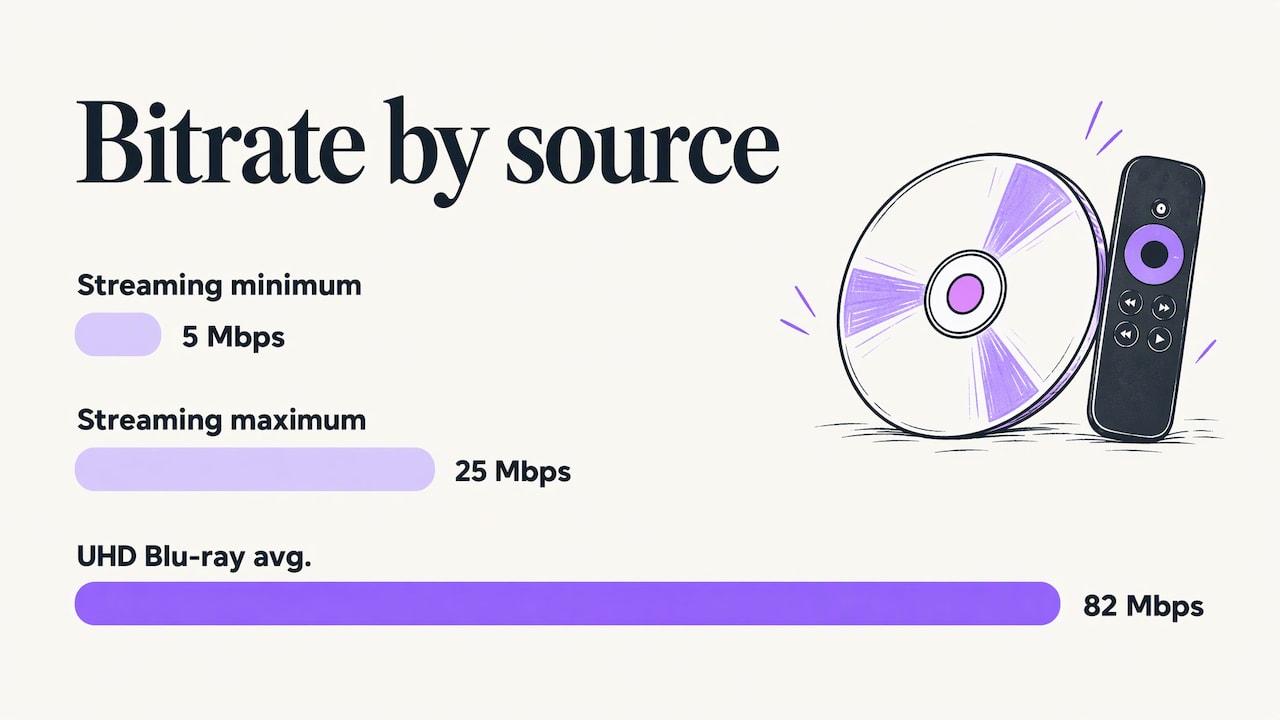
Ultra HD Blu-ray still carries far more data per second than any stream, which is why disc collectors with big home-theatre setups keep buying them. Streams are compressed to fit a home internet connection; a disc is not.
IPTV sits between these worlds: live channels and an on-demand library behind one login, instead of juggling several apps. IPTVWorld carries 25,000+ live channels and 150,000+ movies and series, with 4K on the titles and channels that are broadcast in it. If you're new to the technology, our IPTV explained guide covers the basics.
What You Need to Watch Movies in 4K on Your TV
Four things have to line up. If one is missing, the picture quietly drops to HD.
1. A real 4K TV
Look for a native resolution of 3840 × 2160 on the spec sheet. HDR support (HDR10, and ideally Dolby Vision) is what makes 4K look clearly different, not just a little sharper.
2. A device that plays 4K and HDR
Most smart TVs have built-in apps, but a separate streaming device is often faster and gets updates for longer. IPTVWorld works on Firestick, Roku, Apple TV, Android TV boxes, smart TVs and Windows PCs. Our guides for Firestick, Roku and Apple TV show the setup.
3. The right HDMI port and cable
Google's requirements for its 4K Chromecast are a good general checklist: the TV's HDMI port must support HDCP 2.2 and 60 frames per second, and you should use a high-speed HDMI cable. On many TVs only one or two inputs can do this, often labelled “4K” or “HDMI 2.0”. Plug the device into that one.
4. Enough internet speed
This is where most people run into trouble, so it gets its own section.
How Much Internet Speed 4K Movies Need
Official recommendations sit in a narrow band. Streaming is compressed, so 4K doesn't need hundreds of megabits, but it does need a steady connection with some headroom.
| Platform | Official recommendation for 4K |
|---|---|
| Netflix | 15 Mbps or higher |
| YouTube | A consistent 15 Mbps |
| Google Chromecast (4K) | At least 20 Mbps |
| Apple TV app | At least 25 Mbps |
The safe approach is to take the highest figure that applies to you and add room for everything else on your network. Two 4K streams, a video call and a phone downloading updates can fill a 50 Mbps line quickly. Our internet speed guide breaks the numbers down by household size.
- Test at the TV, not at the router. Run the speed test on the device you watch with, in the room where you watch.
- Count simultaneous streams. Multiply your 4K streams by 15–25 Mbps, then add what everyone else is doing.
- Mind data caps. 4K uses far more data per hour than HD, so a few films a week can use a big share of a capped plan.
- Plan for evenings. A connection that tests fine at noon can slow down at 8 pm.
Wire the TV if you can
Stability matters more than the headline speed on your bill. An Ethernet cable to the main TV removes Wi-Fi problems: neighbours' networks, thick walls and distance. If a cable is impossible, a powerline adapter or a mesh system with a wired backhaul is the next best option. For anything else, see how to fix IPTV buffering.
How to Find Movies That Are Really in 4K
Calling a title “4K” is easy. These habits help you find genuine Ultra HD:
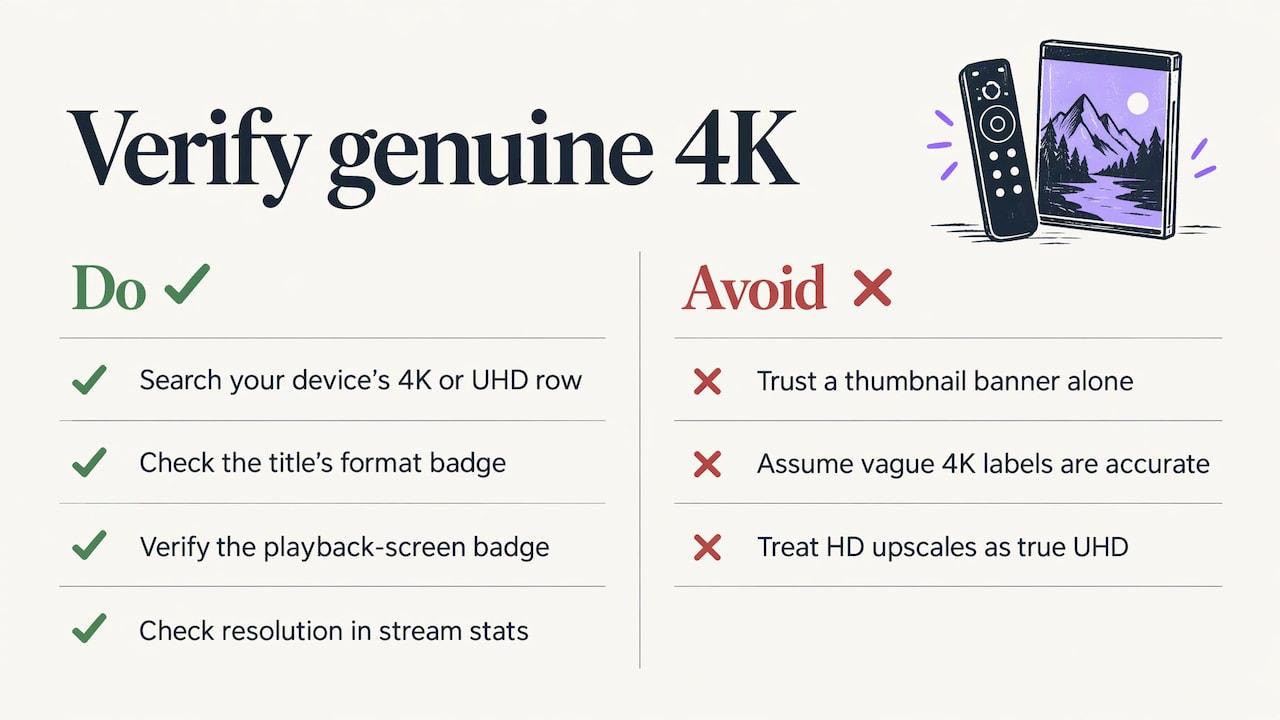
Use your device's own 4K search. On Roku, the 4K Spotlight channel is installed automatically on players that support 4K and HDR, and searching “4K” opens the 4K Movies and TV Zone. Other platforms have similar rows labelled “4K”, “UHD” or “Ultra HD”.
Look for the badge on the title page. Most apps show 4K, UHD, Dolby Vision or HDR10 next to the format details. No badge usually means HD.
Check the stream info. Many players can show the current resolution. 3840 × 2160 is 4K; 1920 × 1080 is not, whatever the thumbnail said.
Remember the source matters. Films shot or scanned at 4K look best. Older films upscaled from HD can look good, but they won't show true Ultra HD detail. Our IPTV 4K streaming guide explains how to tell real UHD from upscaled video, and SD vs HD vs FHD vs 4K explains each label.
Why Your Movie Plays in HD Instead of 4K
- Your speed is too low or unstable. YouTube says that without a strong connection a 4K movie may play in HD or SD, and Apple says its devices automatically switch to a lower-quality version when the connection can't keep up.
- Quality is set to Auto or Low. Pick the highest option in the player settings and see if it holds.
- The wrong HDMI input. A port without HDCP 2.2 or 4K at 60 fps caps the picture.
- Your plan doesn't include 4K. Many apps keep Ultra HD for a higher tier.
- The title isn't offered in 4K. Not every film has an Ultra HD version.
- Wi-Fi congestion. Switch to a cable or move closer to the router and test again.
- An old or overloaded device. Clear the app cache, restart, update the firmware and close background apps.
If an IPTV app freezes or loads slowly rather than just dropping resolution, our IPTV troubleshooting guide lists the fixes in order of how often they work.
A Quick Pre-Movie Checklist
- The TV is in its movie or cinema picture mode, with HDR enabled for the HDMI input you're using.
- The device is on the HDMI port labelled for 4K.
- The app's quality is set to the highest level.
- Nobody else is running a big download.
- A speed test at the TV shows at least 25 Mbps, more if other streams are on.
- The film shows a 4K or UHD label on its info page.
4K Movies and Live TV in One App
Plans start at $14 a month or $64 a year, with no automatic renewal. Try it free for 24 hours on your own TV and connection first.
See the plans, browse the channel list, or read about our 7-day refund for technical problems.
Start Free Trial4K Movies FAQ
Is there a website to watch every movie in 4K?
No. Film rights are split between streaming apps, digital stores and other services, so no single site has every 4K movie. Your options are a streaming app with a 4K tier, a pay-per-title digital store, Ultra HD Blu-ray, or an IPTV service with a 4K on-demand library. Choose by whether you want a rotating catalogue, one new release, or a big library with live TV too.
What internet speed do I need for 4K movies?
Netflix and YouTube recommend 15 Mbps for 4K, Google recommends at least 20 Mbps for its 4K Chromecast, and Apple recommends 25 Mbps for 4K in the Apple TV app. Plan for 25 Mbps per 4K stream to be safe, and add headroom for other devices on your network.
How do I watch 4K movies on my TV?
Use a native 4K TV, a 4K and HDR capable streaming device plugged into an HDMI port that supports HDCP 2.2 and 60 fps, and a steady connection of 15 to 25 Mbps. Set the app's playback quality to the highest level and check the title shows a 4K or UHD label. Connect by Ethernet if you can.
Can I watch 4K movies without a 4K TV?
Yes, but you will see them at your screen's resolution. A 1080p TV or monitor scales the picture down, which can look slightly cleaner than a native HD stream, but you won't see the full detail or the wider colour range of a 4K HDR display.
Why does my 4K movie play in HD?
Usually because the connection is too slow or unstable, so the app switches to a lower-quality version automatically. Other common causes are the quality setting on Auto or Low, the device plugged into an HDMI port without HDCP 2.2, a plan that doesn't include 4K, or a title that simply isn't offered in 4K.
Sources
- Roku Support: How to find 4K, 8K and HDR movies and TV shows
- Google Chromecast Help: Stream 4K Ultra HD content
- Netflix Help: Internet connection speed recommendations
- YouTube Help: Watch HD or 4K movies and TV shows
- Apple Support: Find movies with 4K, HDR, Dolby Vision or Dolby Atmos in the Apple TV app